Showing posts with label Achieving. Show all posts


There probably isn’t a person now who hasn’t got an absolutely indispensable smartphone in their pocket. However, despite this fact, there aren’t many people out there who know about all the incredible things these devices are actually capable of.

1-The easiest way to save your battery power


If you choose a black or simple dark background for your screen, the automatic pixel highlighting will turn off, and you’ll notice that your device keeps its charge for much longer. This feature isn’t available for all Android devices yet, but it’s already implemented on most Samsung smartphones and tablets. Give it a try!

2- Text-to-speech

Image result for Text to speech
Not only can you read this article but you can also listen to it if you have an Android device. So if you prefer to hear incoming information rather than see it, go to Settings -> Accessibility and turn on the Text-to-Speech Output option.

3-Turning on Guest Mode
Image result for 3-Turning on Guest Mode

If you would like to temporarily give your phone to another person yet keep your personal data confidential, use Guest Mode. Swipe down from the top with two fingers, and touch the user icon on the upper right. The Add guest icon will appear, and you’ll be able to choose which actions the person handling your smartphone will be allowed to take.
4 Smartphone remote control
Image result for 4 Smartphone remote control

Just go to Settings -> Security -> Device administrators, and check the boxes next to Android Device Manager, Remotely locate this device, and Allow remote lock and erase. Now if you lose your smartphone, you can locate and block it without losing your data
5-Control your smartphone with head movements
There are situations when you just have to use your gadget but your hands are otherwise occupied or it’s just too cold outside to take your warm gloves off. However, there’s a solution for this! After installing a free app called EVA FACIAL MOUSE you’ll be able to control your Android device with movements of your head!


MORE POSTS


Image result for whatsapp

Instant messaging app WhatsApp is soon going to roll out a shortcut for editing images that will allow users to make the changes in an image they have received on WhatsApp before sending it to other contacts.
Called the ‘Quick Edit Media Shortcut’, this feature is said to save time of the user and the storage of their smartphones in case they want to send an image on WhatsApp by tapping on the edit.

Related image

The feature has been spotted by WABetaInfo, the Twitter account that tracks the changes and upcoming features in the Facebook-owned platform, on both iOS and Android platforms. It has also provided screenshots for both of them to show where the new edit option will appear. While in iOS, the edit icon will appear at the bottom on the screen next to the share icon, in Android users will be able to find the edit option by tapping on the three dot icon on the top right corner.

Image result for whatsapp

As per WABetaInfo, this feature is not yet available on either of the platforms right now as WhatsApp is working on it “in order to ensure the best bug-free experience for you, before the release for everyone.” Therefore there is no final word on when this feature will be rolled out to users.
From the screenshots, it is visible that the Quick Media Edit Shortcut is not bringing any new editing features to the platform and merely provides a quick shortcut to the existing options which include crop, add text and draw doodles.
Earlier this month, it was reported that WhatsApp is also working on rolling out a feature to allow users to scan QR codes easily. As per the tweet, shared by WABetaInfo, WhatsApp is working on this feature in the Android v2.19.189, however, it is not yet visible.

RELEATED POST 
WHATSAPP NEW UPDATE 2019 | WHATSAPP NEW VERSION.


Since the trend of high graphic games has increased, the problem of mobile hangs and charging ends is also increasing. People see a strong battery before buying a new smartphone, but do you know is an application that drains the most battery. According to the mobile ecologist, the Facebook application pulls the most battery.
content="https://boytechnical.blogspot.com/2019/07/phone-just-delete.html" />


47% of smartphone charging uses only Facebook application. If you uninstall it for a few days, you yourself will start to know the difference. By the way your smartphone's battery will run twice, this test was tested from the iPhone 7, which showed that Facebook spends 47% of battery.


This does not mean that you stop running Facebook. If you use it, then install the Facebook light or go to the app's manual settings and turn off things like video autoplay notifications and location. This will drain the battery and the problem of hanging will end.


When you explicitly tell an Android app, “No, you don’t have permission to track my phone,” you probably expect that it won’t have abilities that let it do that. But researchers say that thousands of apps have found ways to cheat Android’s permissions system, phoning home your device’s unique identifier and enough data to potentially reveal your location as well.

Even if you say “no” to one app when it asks for permission to see those personally identifying bits of data, it might not be enough: a second app with permissions you have approved can share those bits with the other one or leave them in shared storage where another app — potentially even a malicious one — can read it. The two apps might not seem related, but researchers say that because they’re built using the same software development kits (SDK), they can access that data, and there’s evidence that the SDK owners are receiving it. It’s like a kid asking for dessert who gets told “no” by one parent, so they ask the other parent.


According to a study presented at PrivacyCon 2019, we’re talking about apps from the likes of Samsung and Disney that have been downloaded hundreds of millions of times. They use SDKs built by Chinese search giant Baidu and an analytics firm called Salmonads that could pass your data from one app to another (and to their servers) by storing it locally on your phone first. Researchers saw that some apps using the Baidu SDK may be attempting to quietly obtain this data for their own use.
Covert channels and side channels
That’s in addition to a number of side channel vulnerabilities the team found, some of which can send home the unique MAC addresses of your networking chip and router, wireless access point, its SSID, and more. “It’s pretty well-known now that’s a pretty good surrogate for location data,” said Serge Egelman, research director of the Usable Security and Privacy Group at the International Computer Science Institute (ICSI), when presenting the study at PrivacyCon.
Related image

Thousands of Android apps can track your phone

The study also singles out photo app Shutterfly for sending actual GPS coordinates back to its servers without getting permission to track locations — by harvesting that data from your photos’ EXIF metadata — though the company denied that it gathers that data without permission in a statement to CNET.
There are fixes coming for some of these issues in Android Q, according to the researchers, who say they notified Google about the vulnerabilities last September. Yet, that may not help the many current-generation Android phones that won’t get the Android Q update. (As of May, only 10.4 percent of Android devices had the latest Android P installed, and over 60 percent were still running on the nearly three-year-old Android N.)

The researchers think that Google should do more, possibly rolling out hotfixes within security updates in the meantime because it shouldn’t just be new phone buyers who get protection. “Google is publicly claiming that privacy should not be a luxury good, but that very well appears to be what’s happening here,” they write. Thousands of Android apps can track your phone.
Google declined to comment on the specific vulnerabilities, but it confirmed to The Verge that Android Q will hide geolocation info from photo apps by default, and it will require photo apps to tell the Play Store whether they’re capable of accessing location metadata.

Android as an operating gadget has faced a few protection threats over the years. However, with everyday safety patch updates and the introduction of facets like Play Protect, etc., Google has decreased the probabilities of downloading an contaminated app. However, there’s nonetheless a way to sideload an app. Though there are quite a few antivirus apps available on Play Store that can add an more layer of safety to the device. But, what if, the machine is already affected by means of a virus or malware. In case you have started out witnessing too many ads, corrupt records error, unexpected slowdown, useless battery drain, etc. then there’s a danger that your smartphone is affected via a virus or you have established an app contaminated with malware, ransomware, etc. Most of the apps or content suspected to elevate such matters are freeware, cheat codes, unauthorized apps, etc.

Third party image reference

In case, you have mistakenly observed such content material or are dealing with issues, here’s our step-by-step guide to getting rid of them from any Android smartphone. 


Third party image reference

Steps to follow:

1.Turn off the smartphone and reboot the device to safe mode by using the volume and power button combination based on the make and model of the device.

2.Once the bootloader is open, choose the option restart in safe mode

3.Once done, head to Settings and then Apps

4.Skim through the list installed the app and check for the app that looks or the one which is not installed by you and tap on it

5.In the next page, tap the ‘Uninstall’ button to remove the app or service from the device.

6.In case, the ‘Uninstall’ button is disabled, then first revoke the ‘admin access’ from the app and then try uninstalling it. Head to Settings > Security > Device administrators and deselect the app and then uninstall it.

7.Now, restart the phone in the normal mode. In case, this does not work for you then try resetting the smartphone by heading to Settings > System > Reset options > Erase all data (factory reset).

Submit Your Site To The Web's Top 50 Search Engines for Free!


At the moment people can be added to WhatsApp groups without their permission but with this new feature, users will be able to change their privacy settings.

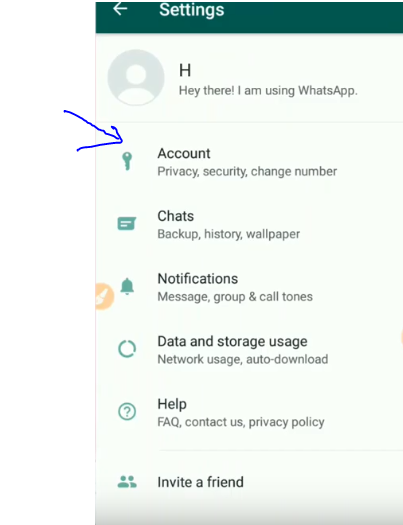
if you want to know it the follow step by step. before use this featurs first update your what app.


step 1 click on what app 

step 2 click on three dots

step 3 click on settings


step 4 click on account.


step 5 click on privacy

step 6 click on group.


step 7 if you want to allow your contact to add you in a group the click on it other wise click on nobody.


I HOPE YOU LIKE IT , IF YOU LIKE IT THEN SHARE IT.


This site  post Attitude Status Quotes Which will inspire you for Achieving your daily goals and long life success.Motivation is a powerful, yet tricky beast. Sometimes it is really easy to get motivated, and you find yourself wrapped up in a whirlwind of excitement. Other times

“If you waste resources trying to decide when or where to work, you’ll impede your capacity to do the work.”


NO 1 ) 


NO 2 ) 


NO 3 ) 


 NO 4 ) 


 NO 5 )